In October, Starlink notified users with outdated software to upgrade their systems by November 17, 2025. Those who ignore these notifications risk losing access to their devices.
According to the support page, users who received the notifications fall into two categories:
- users who must connect their Starlink terminal to power by November 17, or their equipment will become permanently inoperable;
- users who need to connect their Starlink terminal to power and perform a software update. Starting November 18, their terminal will not be able to access the Internet until the update is completed.
Only users who received an email or in-app notification need to follow these instructions. Each message contains a unique Starlink identifier that indicates which equipment needs updating.
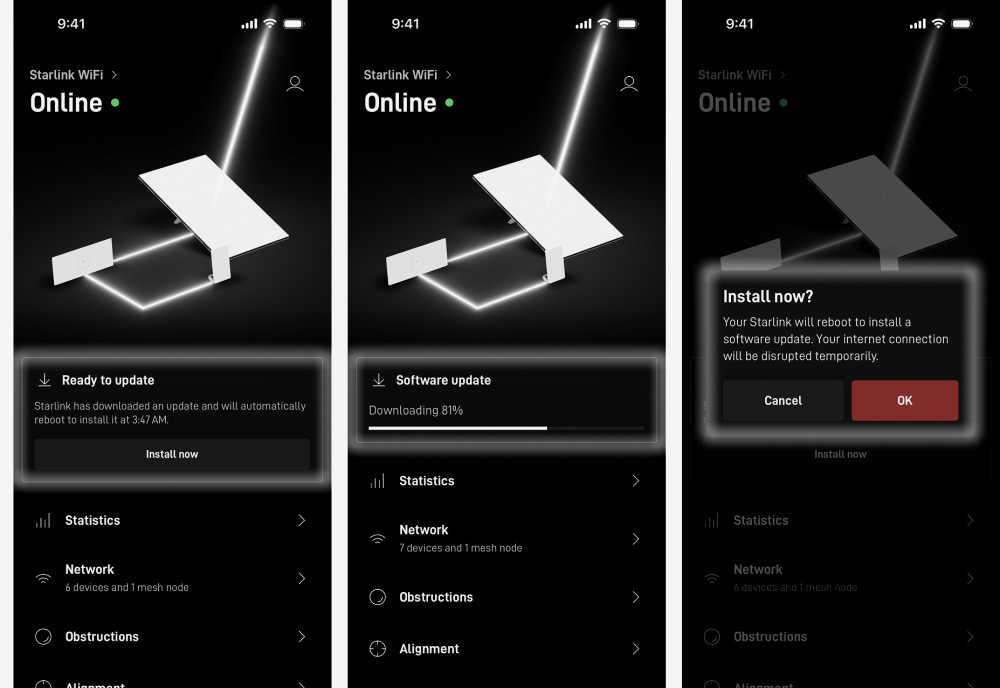
If your email is titled "Attention! Connect your Starlink terminal to power for a critical update," please place the terminal outdoors and connect it to power; a clear sky view is not mandatory. You can monitor the update progress in the app, which will take between 15 to 30 minutes.
If your email is titled "Attention! Update your software," please follow these steps:
- Turn on your Starlink (no need to take it outside);
- Connect to an available Wi-Fi network and open the app;
- Use the "Manual Update" option in the app to update your Starlink terminal;
- Click "Update Now" and do not close the app or disconnect from Wi-Fi during this process.
Software version 2024.05.0 is crucial for download capabilities. Terminals running versions below 2024.05.0 cannot download updates and must be connected to power and aimed at the sky to receive the necessary software.
Terminals with versions between 2024.05.0 and 2024.12.26 can download updates via the app.